Why customers keep emailing you
Most status emails ask the same few things. How much do we have on hand? When does our run start? Can you send the COA for that lot? Where is the invoice? Each answer is easy to find for someone with access, so a planner or office lead stops what they are doing, looks it up, and types a reply.
None of that work moves product. It also does not scale. Add a few customers and the inbox grows faster than the floor does, and the replies get slower right when customers want them faster.
A customer portal gives each customer a login to the answers they are allowed to see. The routine questions stop arriving as email, and your team keeps its time for the requests that need a person. Our post on how customer portals are changing B2B relationships covers the wider shift.
What portal users see
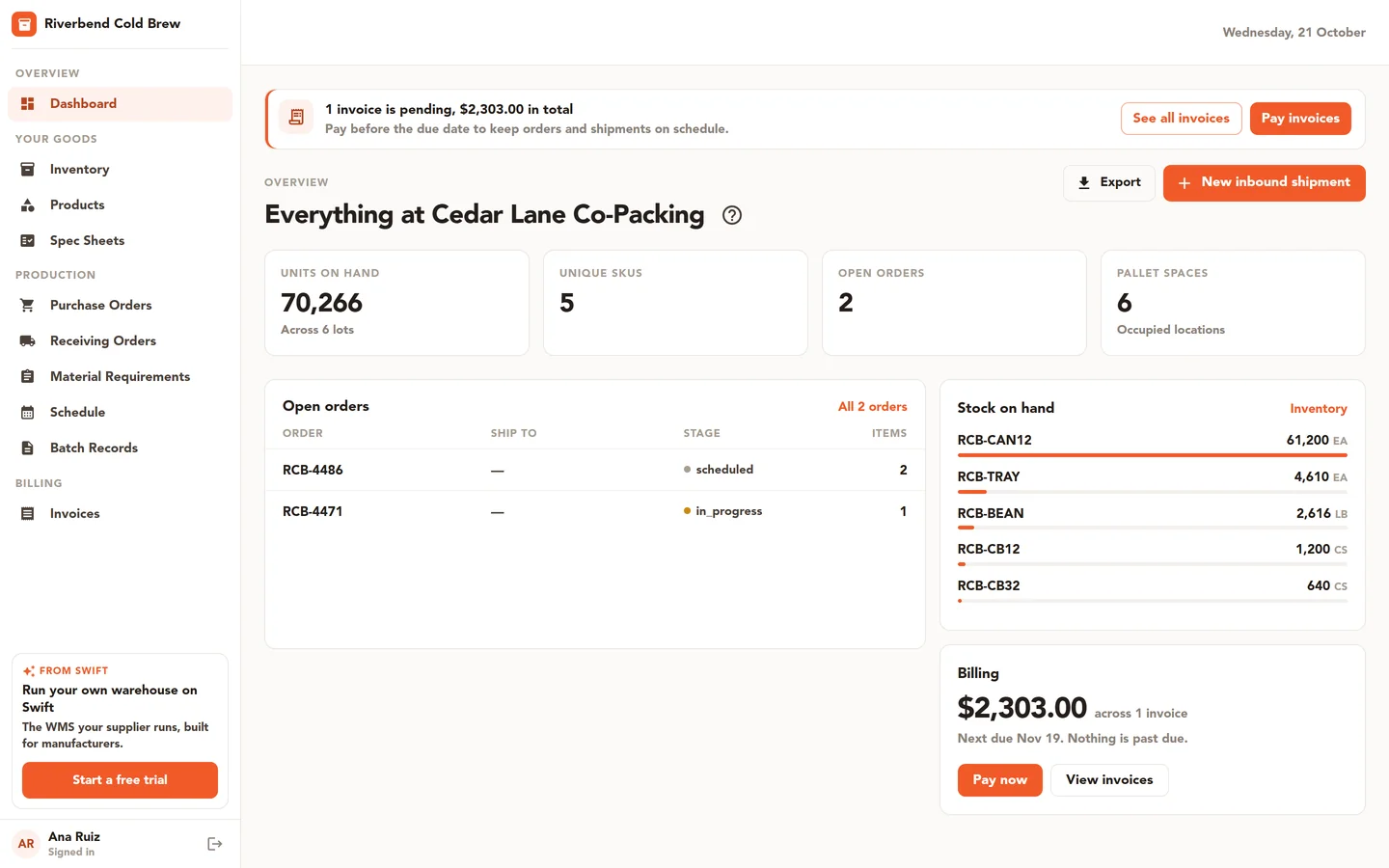
The customer portal in Swift WMS shows each customer their own slice of your warehouse and production data. Nothing is rebuilt or copied for the portal. Depending on the access you give them, a portal user can see:
- A dashboard with a quick view of their account.
- Inventory: what you hold for them, by SKU and lot.
- Products and SKUs, with the documents attached to each one.
- The schedule for their upcoming work.
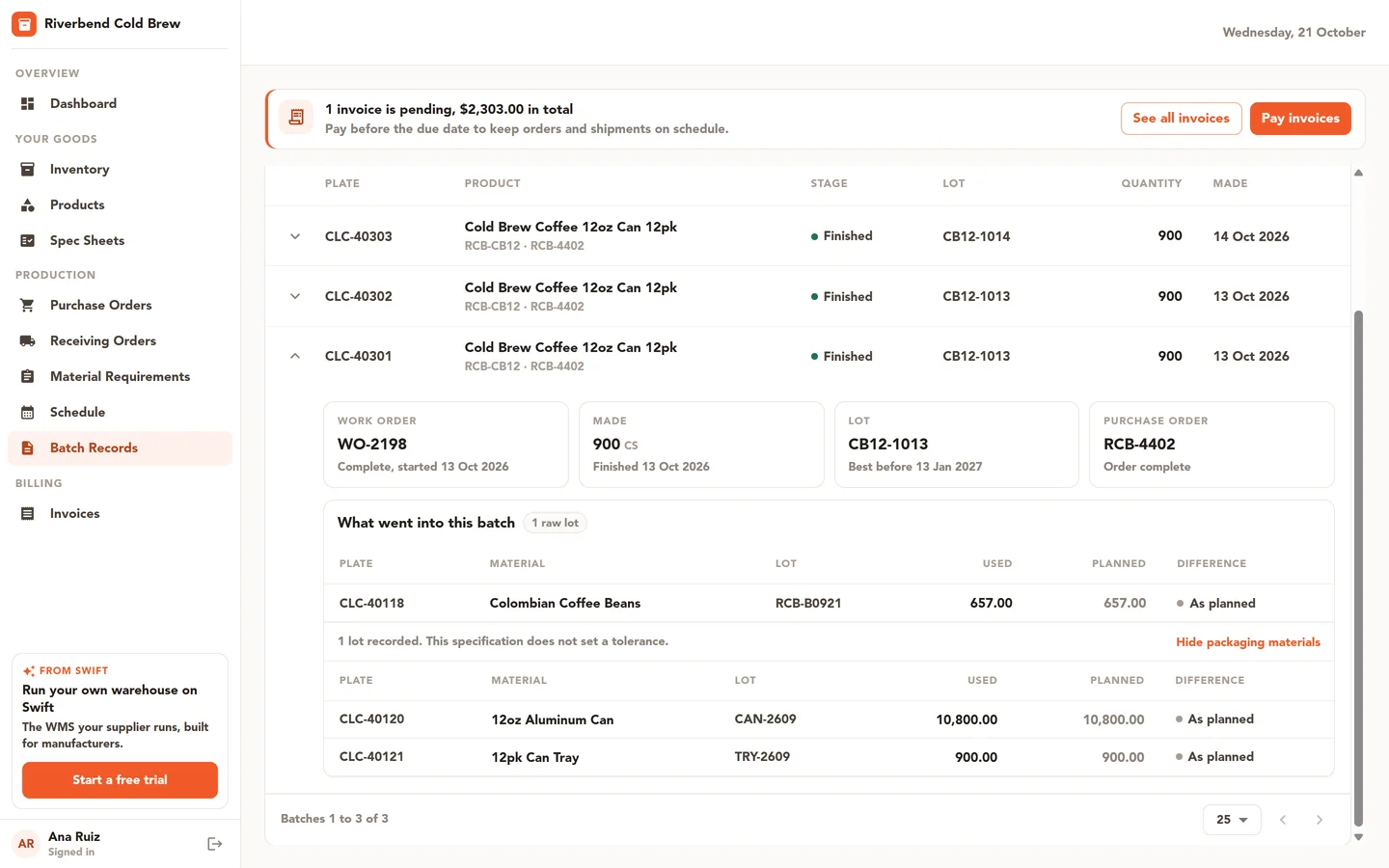
- Batch records and their files, including certificates of analysis (COAs) for their lots.
- Material needs for their work, so they know what is required before a run.
- Spec sheets, which they can review and e-sign in the portal.
- Invoices and payments.
COAs are a common reason customers write in. When your quality team attaches a COA to a lot, the customer can find it next to that lot's batch record. Our guide to managing certificates of analysis by lot explains how to keep those files tied to the right lot from the moment stock arrives.
What portal users can do
A portal is more useful when customers can start work, not only read about it. Portal users with the right access can take these actions:
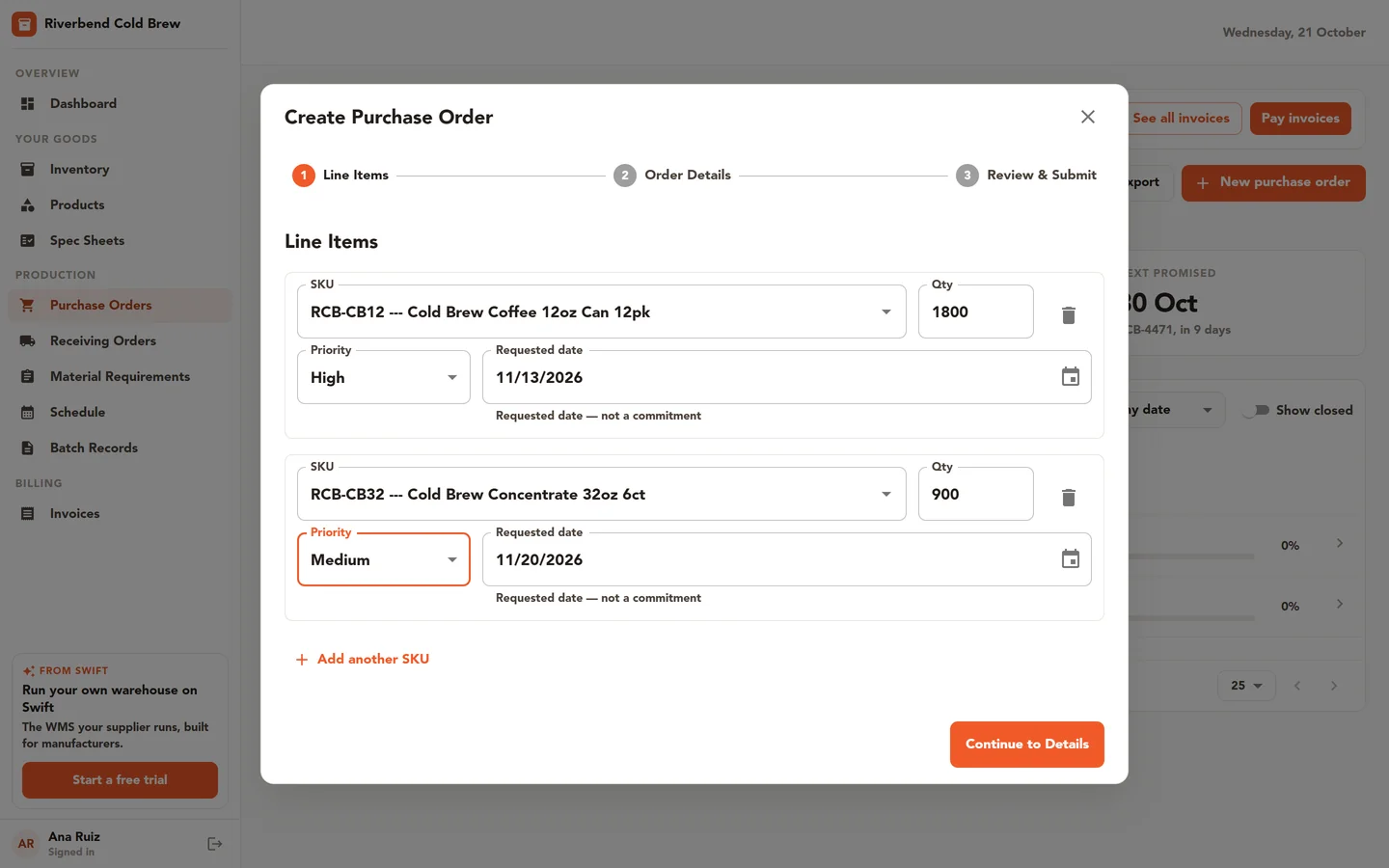
- Create orders through a step-by-step wizard. In Swift WMS a purchase order is the customer's order to you, and your team approves or rejects each one before it goes ahead.
- Create ASNs (advance shipping notices) for stock they are sending you, with carrier, tracking, and bill of lading details. They can save an ASN as a draft or submit it.
- Message your team about an order, a lot, or anything else. Messages need the Core or Pro plan.
- Pay invoices online by card or bank, if you bill them through Swift WMS invoicing.
The approval step matters. A customer can place an order at any hour, but nothing reaches your schedule until someone on your team has looked at it. You keep control of what gets made and when. An ASN works the same way from the other side: it lands in your system as a receiving order, so your dock knows what is coming before the truck arrives.
Decide who sees what
Not everyone at a customer needs the same view. A buyer may need orders and invoices. A quality contact may need COAs, batch records, and spec sheets. An accounts person may only need invoices and payments.
Access in the portal is set per user, per area. You turn each area on or off for each portal user. Inventory, products, orders, ASNs, schedule, batch records, messages, and invoices have their own switches, and seeing orders is separate from creating them. One person at a customer can pay invoices without seeing production details, and another can review COAs without placing orders.
Each portal user sees only their own company's data. A customer never sees another customer's stock, lots, or invoices.
Why the numbers match the floor
A portal that runs on a separate copy of your data is only as good as the last time someone updated it. When a customer sees one number in a portal and hears a different one from your team, they stop trusting both. Then the emails come back.
The customer portal reads the same records your warehouse and production team work from every day. When a receiver puts away a license plate of their product, that is the inventory the customer sees. When your quality team places a lot on hold, attaches a COA, or completes a batch record, the portal shows that same lot. There is no second copy to keep up to date, and no export to forget.
This also means the portal is only as accurate as your floor records. Teams that scan at receiving, move plates in the system when they move them on the floor, and keep lot traceability records current get a portal their customers can rely on.
Plans and setup
The customer portal is included on the Pro plan. On Essentials and Core it is available as an add-on. Some portal areas show records from Core features, such as batch records, the production schedule, messages, and invoices, so the areas you can share depend on the parts of Swift WMS you use. If you make product for other brands, see how the portal fits that work on our page for co-packers and contract manufacturers.
If you are comparing portals, see how the Swift WMS portal lines up with MRPeasy and BatchMaster.
Your team creates portal users and sets their access. Start with one or two customers who email you the most, turn on the areas they ask about, and add more as you learn what they use. To see the portal with your own data, contact our team.
Common questions
- Which Swift WMS plans include the customer portal?
- The customer portal is included on the Pro plan. On the Essentials and Core plans you can add it as an add-on. Some portal areas show records from Core features, such as batch records, the production schedule, and invoices, so what you can share with customers depends on the parts of Swift WMS your team uses.
- Can a customer place an order through the portal without our approval?
- No. Customers create orders through a step-by-step wizard in the portal, but your team approves or rejects each one. In Swift WMS these customer orders are called purchase orders, because they are the customer's order to you. Nothing moves forward until someone on your side has reviewed it, so you stay in control of what gets made and when.
- Can I limit what each person at a customer sees?
- Yes. Access is set per portal user, per area. You can turn on inventory, products, orders, ASNs, schedule, batch records, messages, and invoices separately for each person, and viewing orders is a separate switch from creating them. A customer's accounts contact can pay invoices without seeing production details, and a quality contact can review COAs without placing orders. Users only ever see their own company's data.
- Can customers download certificates of analysis from the portal?
- Customers can see the COA files your team has attached to their lots, alongside the batch records and other files for that lot. Swift WMS stores the COAs you receive from suppliers or labs and attach to each lot. It does not write the certificate itself, so the portal shows exactly the documents your quality team has attached.
- How do customers tell us about stock they are sending?
- Portal users with access can create an ASN, or advance shipping notice, for an inbound delivery. They can add carrier, tracking, and bill of lading details, and save it as a draft or submit it. The ASN shows up in Swift WMS as a receiving order, so your dock team knows what to expect and can receive against it when it arrives.
Further reading
- How Customer Portals Are Transforming B2B Relationships
Give customers self-service access to inventory, orders, production schedules, and certificates of analysis, straight from the system your warehouse runs on.