Why production belongs next to inventory
Many small manufacturers plan production in one place and track inventory in another. The whiteboard says a blend runs Tuesday, but nobody can see that the only lot of the key ingredient is on hold. The plan and the shelf drift apart, and the floor finds out when the job is already set up.
Swift WMS runs work orders, staging, and batches on the same license plates your warehouse already tracks. Production management is part of the Core plan. It builds on the license plate inventory included on Essentials, Core, and Pro, and it feeds the batch records and lot traceability your quality team relies on.
If you are comparing tools, see how Swift WMS production lines up with MRPeasy and Katana.
Bills of materials and work orders
A bill of materials lists what goes into one finished SKU. In Swift WMS a BOM holds four kinds of components: ingredients, packaging, boxes, and inclusions. Set it up once and every work order for that SKU starts from the same recipe. Our guide to bill of materials basics covers what to put in one and the mistakes to avoid.
A work order records the customer, the SKU, the quantity, and the BOM. It also carries a start date, a due date, a priority, the production line, and estimated hours. When a customer purchase order is saved, work orders are created from it, so planners do not retype the order.
Each work order moves through statuses that match how a job really travels through the building:
- Requested Date and Scheduled, while the job is being planned
- Staging, while material is reserved and pulled
- Blending and In Production, while the line is running it
- Production Paused, when a job stops partway
- Complete and Quality Release, when the run is done and waiting on sign-off
- Canceled, when the order goes away
Staging, batches, and finished goods
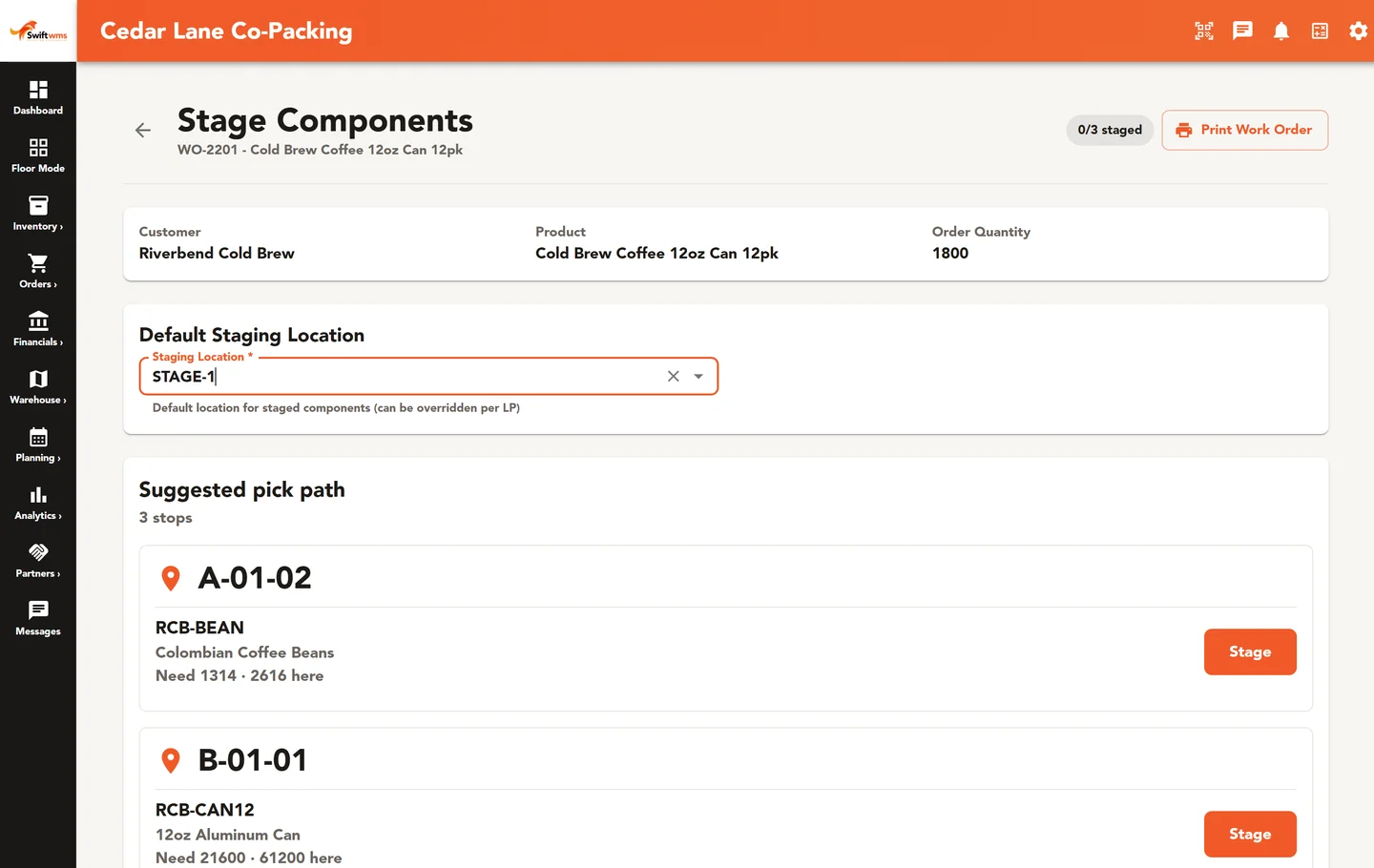
Staging is where the plan meets the shelf. For each work order you reserve the specific license plates the floor will use, down to the lot. Then you print a picking-list PDF so the material handler knows which plate to pull and where it sits. The floor pulls named plates, not “some of the sugar,” so the lots going into the run are known before it starts.
A batch is a work-in-process lot. Operators build it by consuming staged plates, and scrap is recorded against the batch instead of turning up later as a mystery adjustment. Each WIP lot keeps its place in the genealogy, from received ingredient to finished good to shipment.
When product is done, Create Finished Good makes a new lot and license plate and updates the completed units on the work order. If a run makes more than the order needs, the overproduction can go to other work orders instead of sitting as unexplained stock. When one blend serves several work orders, a production run groups them so the blend is made once and shared.
WIP tracking for food and beverage plants
Work in progress is where food and beverage plants most often lose track. A kettle of sauce, a tote of blended powder, or a tank of syrup is no longer an ingredient and not yet a finished good. If that in-between stock has no lot of its own, a recall question about it has no clean answer.
In Swift WMS each batch is a WIP lot with its own record. It shows the ingredient plates it consumed, the scrap recorded against it, and the finished lots it went into. The work order status shows where each job stands, from Staging through Blending and In Production to Quality Release. If an ingredient lot turns out to be bad, Recall Impact on Core lists the downstream lots, the work in progress, and the shipped destinations it reached, so you can act before anything else ships.
Scheduling lines with capacity in view
The Production Schedule is a calendar of work orders. To move a job, drag it to a new date. Swift WMS asks you to confirm before it saves, so an accidental drag cannot quietly reshuffle the week.
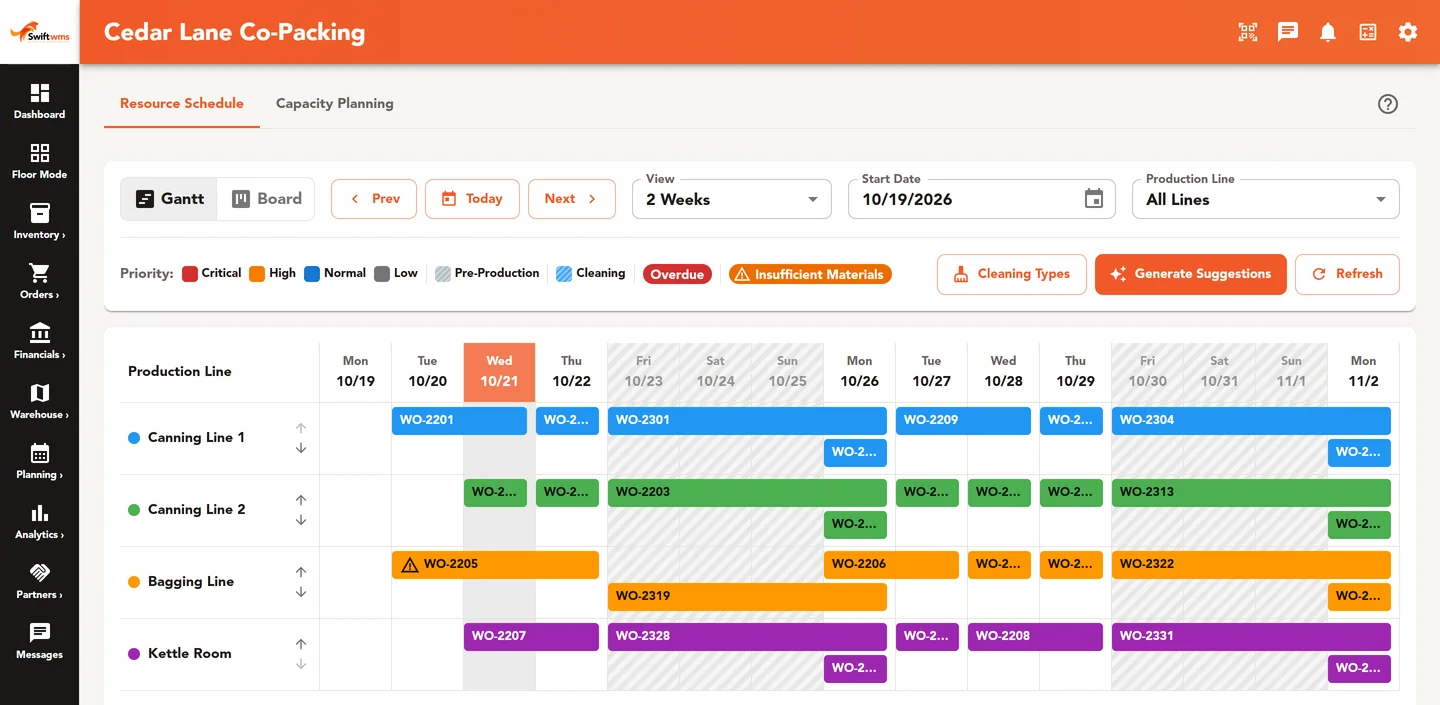
The Resource Schedule shows the same work as a Gantt chart, with dates across the top and production lines down the side. You see at a glance which line is idle and which is stacked. It can also suggest a schedule, which gives planners a starting point to adjust instead of a blank board.
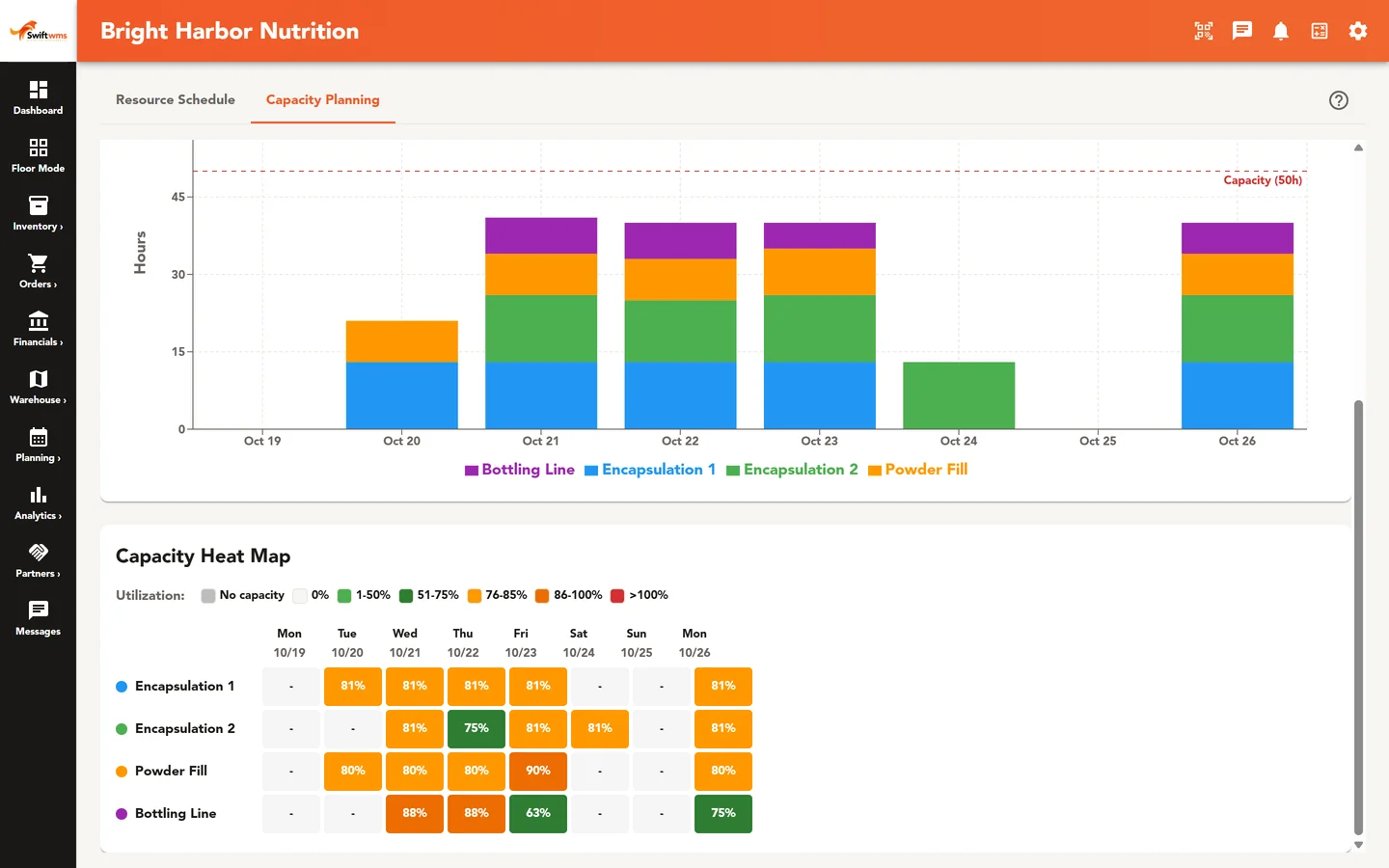
Capacity Planning answers the question every planner asks on Monday: can we actually run all this? It shows a utilization chart, a heat map of busy and quiet days, and a count of days over capacity. For the thinking behind a live schedule, read 5 ways real-time production scheduling boosts throughput.
Equipment and labor on the same page
Lines stop when equipment fails. Swift WMS keeps a maintenance schedule for each piece of equipment, with checklists the technician works through. Overdue and upcoming lists show what needs attention before it becomes downtime in the middle of a run.
Production Tracking records what each shift actually did: the shift, the line, units made, hours, number of workers, and labor cost. Over a few weeks that gives planners real history to set estimated hours on new work orders, instead of a number someone remembered.
Where quality fits
Quality Release is a work order status, so finished work has a clear step for sign-off after production is complete. Lot holds stop held lots from being consumed or shipped, which keeps a questionable ingredient out of the next batch. Each work order has a batch record with forward and backward traceability for the day a customer or auditor asks what went into a lot. Confirm what your own program requires with your quality team.
Common questions
- Which plan includes production management?
- Production management is part of the Core plan. That covers bills of materials, work orders, staging, batches, the Production Schedule and Resource Schedule, equipment, and Production Tracking. Pro includes everything in Core and adds features such as material requirements and documents. A 30-day trial set up by our team lets you run a few real work orders with your own SKUs before you decide.
- Can one blend fill more than one work order?
- Yes. A production run groups several work orders that share a blend, so the floor makes the blend once and splits it across the orders. Each work order still keeps its own quantities and completed units. If a run makes more than an order needed, the overproduction can be assigned to other work orders instead of being left as loose stock nobody planned for.
- Does Swift WMS build the schedule for us?
- It helps, but planners stay in charge. The Resource Schedule can suggest a schedule across your production lines, which gives you a starting point. From there you drag work orders on the Production Schedule calendar to the dates you want, and each move asks you to confirm before it saves. Capacity Planning then shows which days are over capacity.
- How do we know which lots went into a finished good?
- Staging reserves specific license plates, and batches are built by consuming those plates. That means each WIP lot and finished lot records the lots that went into it. The batch record for the work order gives forward and backward traceability, and lot trace and recall impact on the Core plan follow those lots through to where they shipped.
- Can Swift WMS track work in progress?
- Yes. Each batch is a work-in-process lot with its own record of the ingredient plates it consumed, the scrap recorded against it, and the finished lots it went into. Work order statuses show whether a job is staging, blending, in production, paused, or waiting on quality release. Batches and work orders are part of the Core plan.
- What does Production Tracking record?
- For each entry it records the shift, the production line, units made, hours worked, the number of workers, and labor cost. A supervisor can add an entry as each shift ends. Over time it shows how lines really perform, which helps planners set realistic estimated hours on work orders and spot a line or shift that keeps falling behind.
Further reading
- Bill of Materials Basics for Small Manufacturers
What belongs in a bill of materials, how a BOM drives staging and batch production, and the BOM mistakes that throw off inventory counts and costs.
- 5 Ways Real-Time Production Scheduling Boosts Throughput
Five ways a live production schedule, a capacity view, and staged materials help manufacturers run more product and spend less time waiting.