A spreadsheet can tell you that you have 400 cases of a SKU. It cannot tell you which pallet they are on, which lot each pallet came from, or which rack it sits in. That gap is where most inventory mistakes start: the wrong lot pulled for a batch, a held lot shipped by accident, or a pallet nobody can find.
Swift WMS closes the gap with license plates. A license plate is a record with its own LP ID and barcode label, and it holds one quantity of one SKU and one lot at one location. Each plate also records the customer who owns the stock. License plates, locations, receiving, shipping, and Floor Mode are on every tier, starting with Essentials.
Because a plate holds only one SKU and one lot, a mixed pallet becomes two plates. That rule is what makes the rest of the system work. A move, a count, or a lot hold always acts on a known quantity of a known lot. If the idea is new to you, our guide to what a license plate number is covers the basics.
Pallet license plates, pallet IDs, and LPNs
In most warehouses one license plate is one pallet, so you will also hear it called a pallet license plate, a pallet ID, or an LPN (license plate number). Swift WMS uses the same idea at any size. A plate can be a full pallet, part of a pallet, or a few cases, as long as it holds one SKU and one lot.
Each plate gets a printed barcode label with its LP ID. Put the label on the pallet, and every scan after that, from putaway to the last shipment, finds that exact stock in one step. When part of a pallet is split off, the new plate gets its own LP ID and label, so both halves stay tracked.
Receiving with a barcode scanner
Stock gets its plate at the dock, not later at a desk. Swift WMS gives you three ways to receive, so a quiet morning and a full dock can each work the way that suits them.
- Single receive: choose the customer, search the SKU by UPC or name, enter the quantity and location, and save. The system creates one plate with an automatic LP ID. Lot name and expiration date are required for ingredient SKUs, and you can attach notes, files, and a COA.
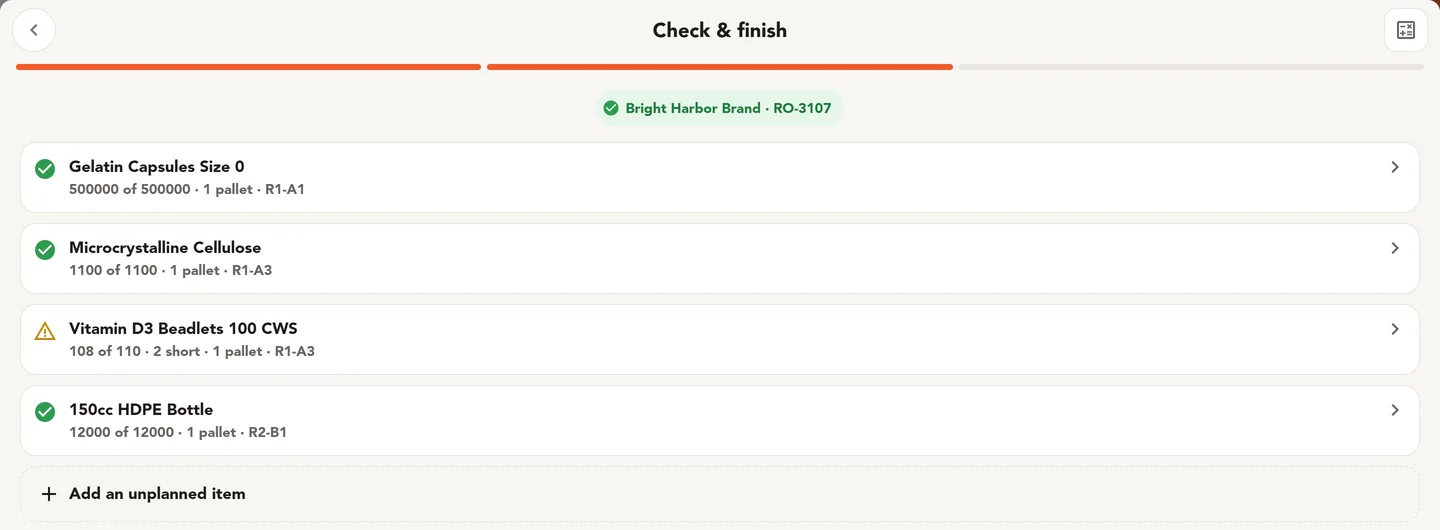
- Bulk receive against a receiving order: each line shows the expected and actual quantity, with lot, expiration, and location per line. Add items that arrived but were not planned, print all labels at once, and mark the receiving order completed. Receiving orders are on Core, or on Essentials with the Receiving + POs add-on.
- Floor Mode receive: scan the customer, scan the SKU barcode, enter the quantity, and scan the location. Floor Mode also lists open ASNs, so the receiver can see what is due.
A receiving order records the customer, expected delivery date, receiving order number, supplier, delivery time, and notes. For more on getting this first step right, read our warehouse receiving best practices.
Named locations and location labels
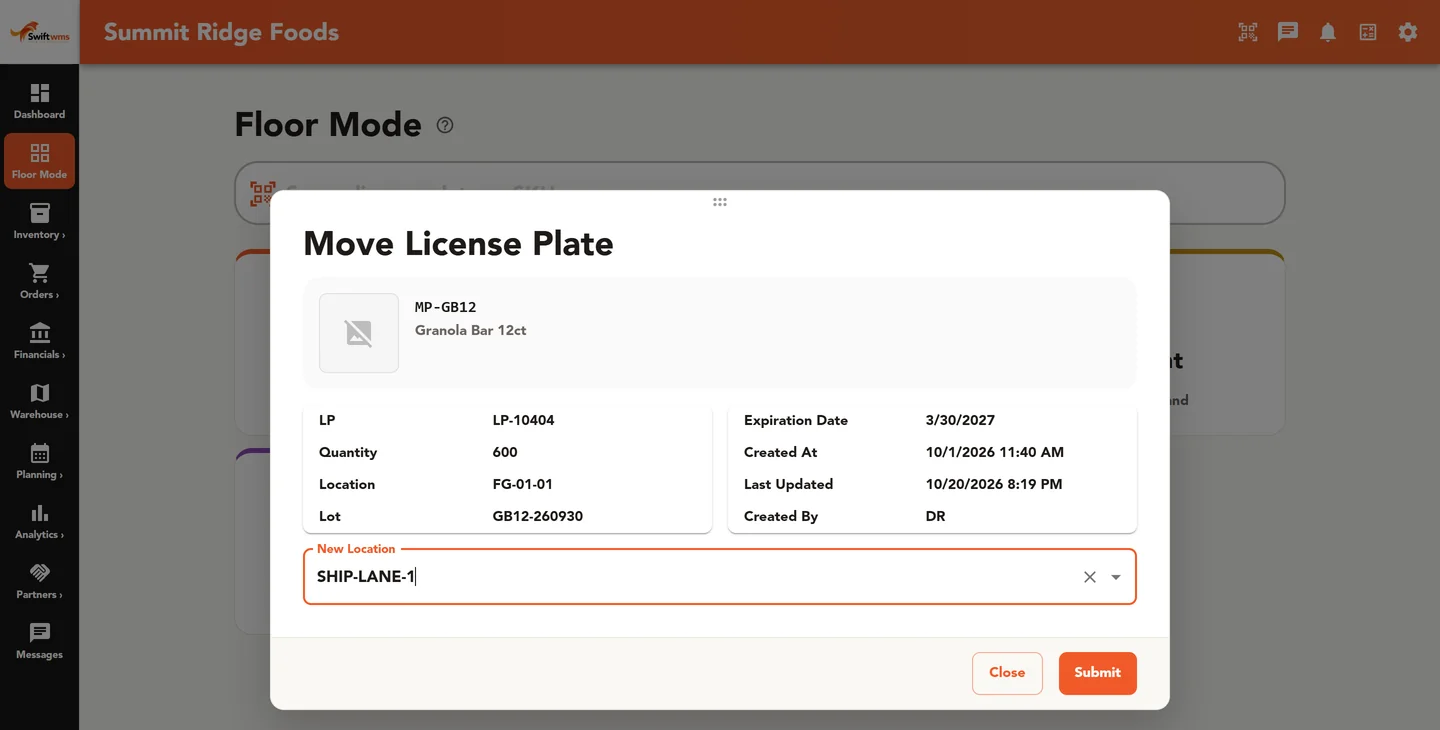
Every plate sits in a location with a unique name, such as A-01-02. Each location belongs to a warehouse row, and you can print a barcode label for it to fix on the rack or the floor. When a receiver scans that label, the plate lands in the right place and nobody types a code by hand.
Your team chooses or scans the location at receipt and moves the plate later as needs change. The system does not direct putaway, so your own layout rules stay in charge. Locations can also enforce allergen separation. Our guide to naming warehouse locations shows how to build codes people can read at a glance.
On Pro, Warehouse Layout adds a floor plan view of your building. Storage areas can be racks, floor storage, pallet positions, or staging, and zones mark aisles, walls, staging, and docks.
Everything you can do with a plate
Stock does not sit still, so the plate goes with it. Each action below starts from the plate, and each one is recorded in the plate's history.
- Move: send a plate to a new location, or bulk move many plates at once.
- Split: break part of the quantity off onto a new plate, for example when a batch needs only half a pallet.
- Combine: merge plates into one. Swift WMS allows this only for plates of the same lot, so lots never mix.
- Adjust: correct a quantity. A reason is required on every tier, so each change explains itself later.
- Hold lot and release hold: stop a lot from being shipped until quality clears it.
- Ship: ship a full plate or part of one, with a tracking ID and a packing slip PDF.
- Transfer: send plates to another warehouse with a warehouse transfer.
- Print label, view lot details, edit, and consume, for the everyday work in between.
A lot hold applies to the lot, not only to the plate you started from. While it is in place, the held lot cannot ship. With lot holds turned on in production settings, it also cannot be consumed in production. Another setting can hold new ingredient lots automatically when they arrive, until quality has checked them.
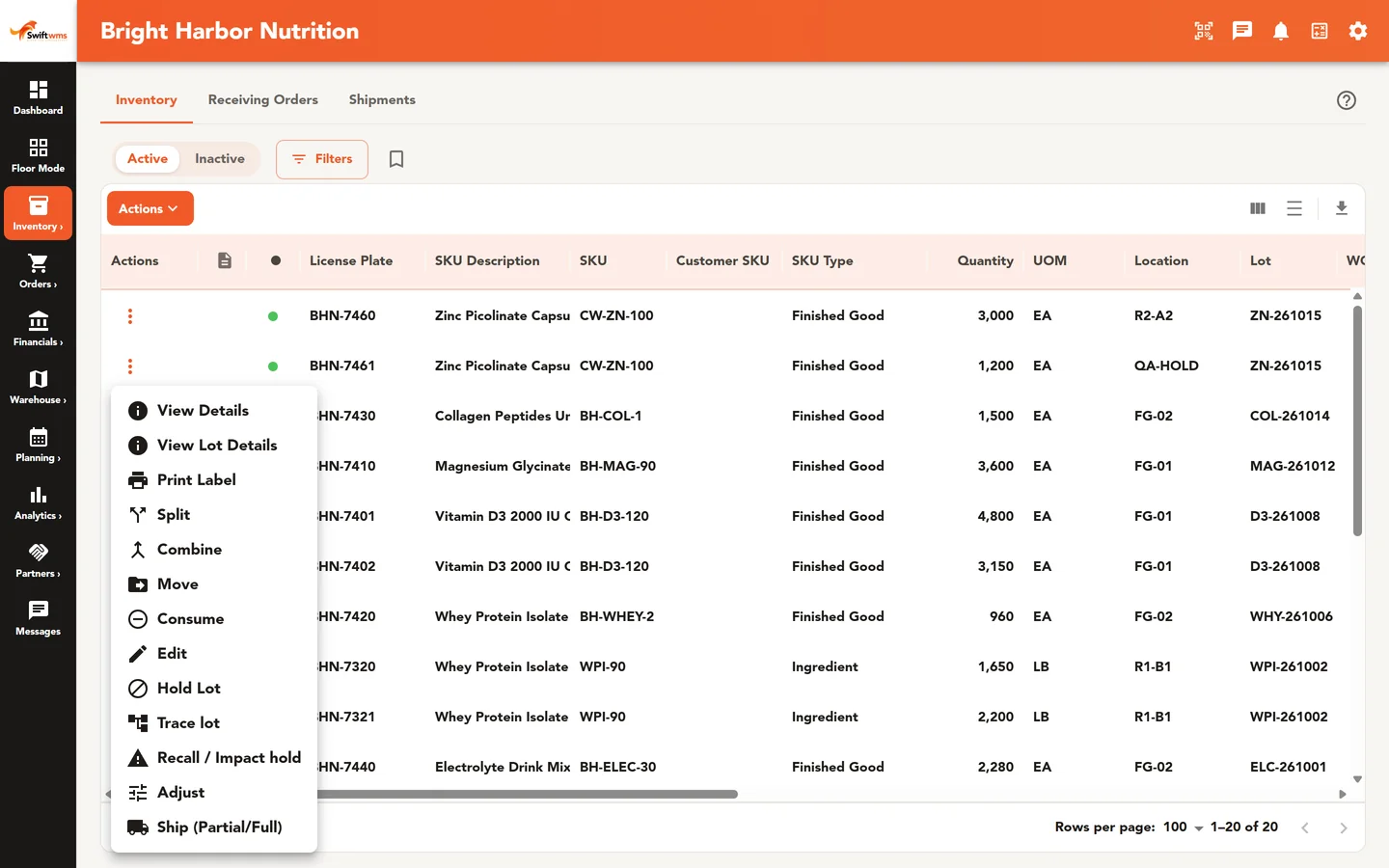
Plate statuses and LP history
Each plate shows a status: Available, Allocated, On Hold, or In transit. A planner can see which stock is ready to use and which is already spoken for or blocked, without a walk to the floor. Inventory filters also show lots expiring within 30 days and stock on hold.
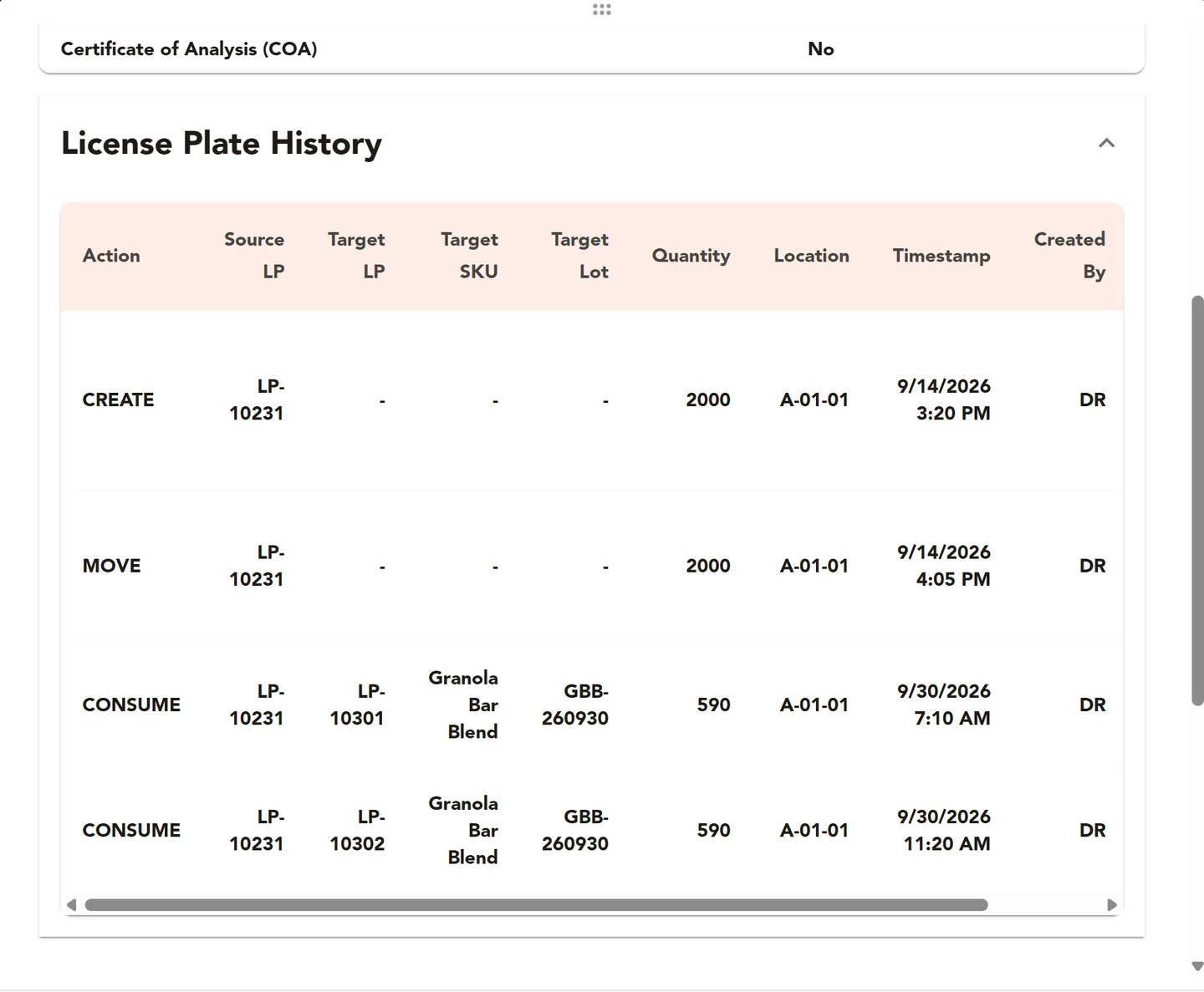
Each plate keeps an LP history. When a customer asks why a pallet shows 38 cases instead of 40, the plate's history is where you look, not someone's memory. Plates are also the base for lot traceability on Core, where Lot Trace follows a lot onto every plate it went into and on to where those plates shipped.
One warehouse or several
Essentials includes one active warehouse, Core includes two, and Pro has no limit. Once two or more warehouses are active, Warehouse Transfers move plates from one site to another. You can limit each user to the warehouses they work in, so a receiver at one building works only with that building's stock.
Floor Mode with hardware scanners
Floor Mode is the screen your team uses on the warehouse floor. It has large text and short steps for Receive, Move, Ship, Lookup, and Cycle Count, with cycle counting on Pro. It works with hardware keyboard-wedge barcode scanners, which type each scan into the screen the way a keyboard would.
Swift WMS runs in a web browser and needs a network connection to save work. You can add Floor Mode to a device's home screen so it opens like an app. To try it with your own SKUs and locations, contact us and ask about a 30-day trial set up by our team.
Common questions
- What is a license plate in Swift WMS?
- A license plate is a record with its own LP ID and barcode label. It holds one quantity of one SKU and one lot at one location, and it records which customer owns the stock. Every receive creates a plate, and every move, split, adjustment, hold, and shipment acts on a plate. That way you always know what you have, which lot it is, and where it sits.
- Is a license plate the same as a pallet ID or an LPN?
- Yes, it is the same idea under different names. A pallet license plate, a pallet ID, and an LPN all name one tracked unit of stock with its own barcode. In Swift WMS that unit is a license plate with an LP ID. It is often a full pallet, but it can be any quantity, as long as it holds one SKU and one lot.
- Which plan includes license plates?
- License plates, locations, single receiving, shipping, and Floor Mode are on every tier, starting with Essentials. Bulk receiving against a receiving order needs Core, or Essentials with the Receiving + POs add-on. Lot Trace and Recall Impact are on Core. Warehouse Layout and cycle counting are on Pro. Our team can help you choose the tier that fits your operation.
- Can one plate hold two lots?
- No. A plate holds one SKU and one lot. If a pallet arrives with two lots on it, receive it as two plates with two labels. The combine action also merges only plates of the same lot. This rule keeps your lot records clean, so a hold, a trace, or a count always acts on a known quantity of a known lot.
- What happens when I put a lot on hold?
- The hold applies to the whole lot, not only to the plate you started from. While the hold is in place, the lot cannot ship. With lot holds turned on in production settings, it also cannot be consumed in production. When quality clears it, release the hold and the stock can be used again. A setting can also put new ingredient lots on hold automatically when they are received.
- Do I need special hardware to scan barcodes?
- Swift WMS runs in a web browser, and Floor Mode works with standard hardware keyboard-wedge barcode scanners. These scanners type each scan into the open field, the same way a keyboard does. You can add Floor Mode to a device's home screen so it opens like an app. A network connection is needed, because work is saved as it happens.
- How many warehouses can I run?
- Essentials includes one active warehouse, Core includes two, and Pro has no limit. With two or more active warehouses, you can send plates between sites with Warehouse Transfers. You can also limit each user to the warehouses they work in, so every site's team sees and changes only the stock in their own building.
Further reading
- What Is a License Plate Number (LPN) in a Warehouse?
A license plate number ties a quantity of one SKU and lot to one location. How LPNs work, when to use them, and how they replace bin-by-bin spreadsheets.
- Warehouse Receiving Best Practices for Small Teams
How to receive inbound stock accurately with a barcode scanner: expected quantities, lots and expiration dates, labels, and where the stock goes first.
- How to Set Up a Warehouse Location Naming System
Name aisles, racks, and bins so every location is unique, scannable, and easy to find, and avoid the naming mistakes that force a full re-label later.
- Why Manufacturers Are Outgrowing Inventory Spreadsheets
The hidden costs of tracking inventory in spreadsheets, the signs you have outgrown them, and what to look for in the system that replaces them.