Your customers own the stock, you run the floor
A co-packer holds goods that belong to other companies. The coffee beans, the cans, the trays, and the finished cases all have an owner, and most of the time it is not you. When a brand asks how much of its product is on hand, the answer has to be for that brand alone, not a total for the whole building.
In Swift WMS, every license plate is received under a customer. A plate holds one SKU and one lot in one location, and it keeps its owner for as long as it exists. The same rules apply to every brand you make for, so your receivers learn one routine instead of one per customer. In the portal, a brand's inventory shows its own customer SKU, so your team and the brand can use the same item names on a call.
That ownership carries into everything else. Holds, batches, and shipments all start from plates that already know which brand they belong to. Nobody has to split out one customer's stock by hand at the end of the month.
Inbound materials from each brand
Many brands send you their own raw materials and packaging. Others ask you to buy for them. Either way, the dock needs to know what is coming, and for whom, before the truck backs in.
On the Core plan, your team creates a receiving order for each expected delivery, with the customer, the supplier, and the lines you expect. If a brand uses the customer portal, its people can send the same details as an ASN, or advance shipping notice, with carrier and tracking numbers. The receiver then works from a list, not a guess.
Ingredient SKUs need a lot name and an expiration date before the receipt can be saved. If a brand wants its paperwork checked first, you can turn on an option that puts each new ingredient lot on hold when it arrives. The lot waits until your quality team reviews it and releases it.
Running their BOM on your lines
Each brand has its own recipe and its own packaging. Your job is to make their product their way, on lines you share with many other customers.
On the Core plan, each finished good has a bill of materials. In Swift WMS, a purchase order means the brand's order to you, and saving one creates the work orders to make it. Your team stages the exact plates a run needs, makes batches by consuming those plates, and records the finished lots. If a run makes more than the order needs, the extra can go to another work order instead of sitting as loose stock.
Because every input plate already belongs to the brand, the finished lot does too. Our production management page walks through work orders, staging, and batches in more detail.
Give each brand its own portal
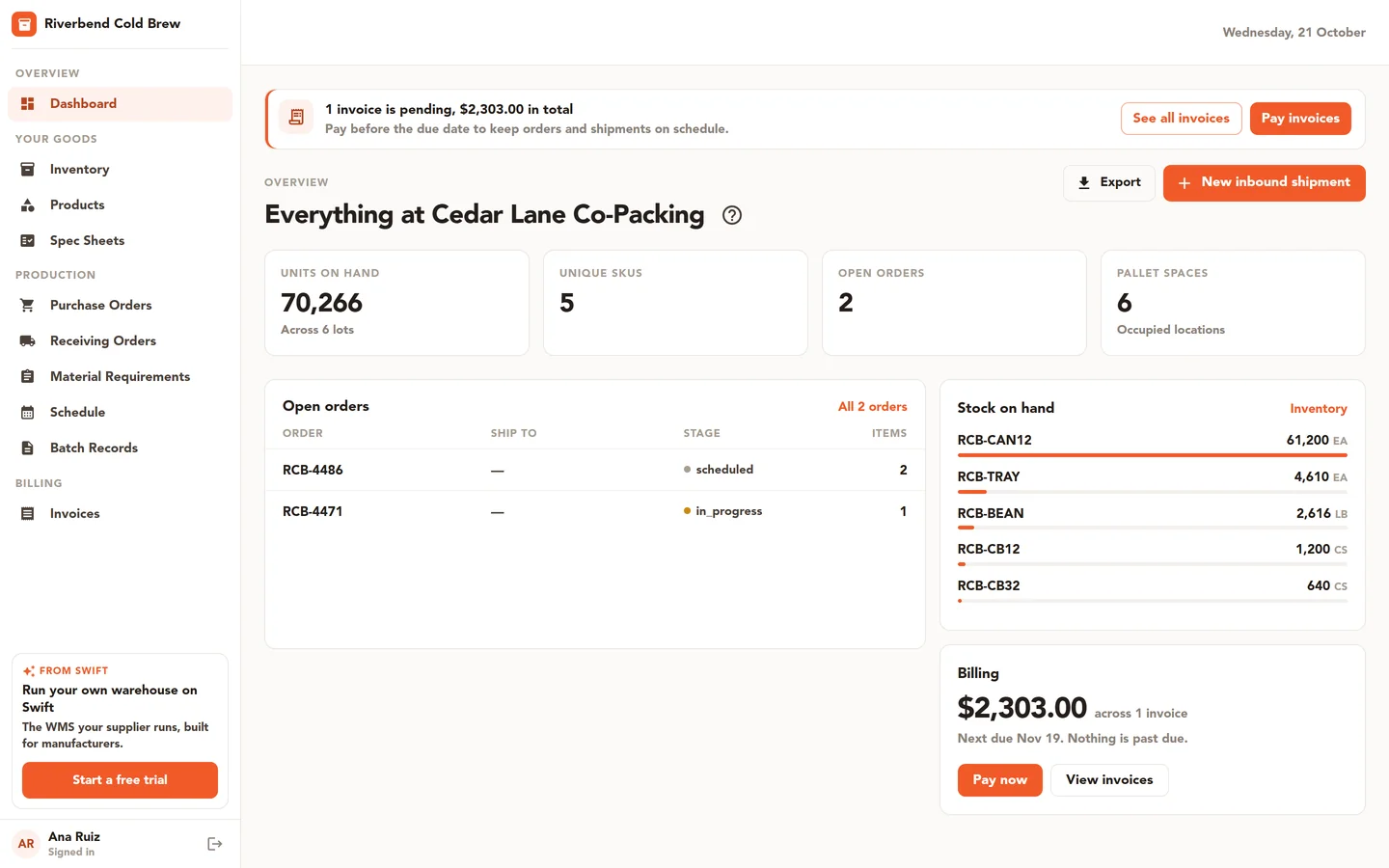
Brands want answers between your calls. How much do we have? When does our run start? Can we get the COA for that lot? A portal lets them look it up on their own.
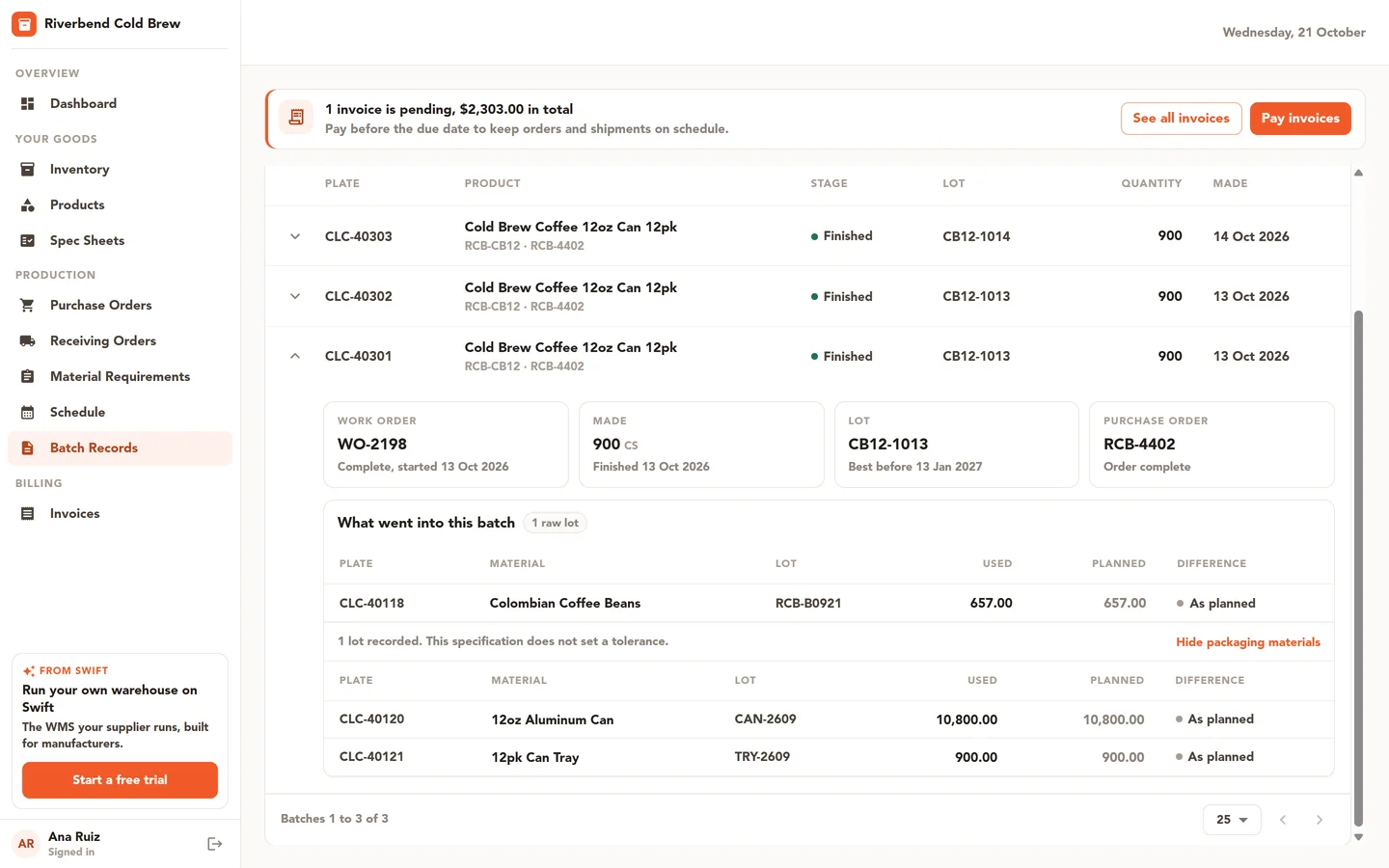
The customer portal is included on the Pro plan, and it is an add-on on Essentials and Core. Each brand gets logins that show only its own records. Depending on the access you grant, a portal user can:
- Check inventory by SKU and lot.
- Place a purchase order through a step-by-step wizard. Nothing moves until your team approves it.
- Open batch records that list every lot used in a batch.
- Download the COAs your team attached to their lots.
- Review and e-sign spec sheets.
- See invoices and pay them online.
Access is set per user and per area, so a buyer and a quality contact at the same brand can see different things. A brand never sees another brand's stock, orders, or files. Read more on the customer portal page, or in our post on how portals change B2B relationships. If you run BatchMaster today, our BatchMaster alternative page sets its portal beside ours.
Billing for storage and receipts
Co-packers often charge for more than the product. Pallets sit in your racks for weeks, and each receipt takes labor at the dock. Those charges are easy to miss when they live in a separate spreadsheet.
WMS invoicing on the Core plan lets you bill storage, receipts, and other fees from the same records your floor keeps. You can build storage invoices, add manual lines and rates, email invoices, and record payments made outside the app. A brand with portal access can see its invoices and pay online.
When a brand calls about a lot
Sooner or later a brand will call about a problem lot. They want to know where it went and what else it touched, and they want the answer the same day.
On the Core plan, Lot Trace starts from one lot and shows every plate it went into and the shipments that carried them. Recall Impact starts from a bad lot and lists the downstream lots, the work still in progress, and shipped rows that name the customer and order. You can hold every impacted lot in one step, and both screens export to CSV. Since each plate already carries its owner, you know from the start which brand's goods are involved.
COAs matter here too. Our guide to managing certificates of analysis by lot shows how to keep each file tied to the lot it covers. Swift WMS stores the COAs you attach; it does not write them. To see this with your own brands and SKUs, talk to our team.
Common questions
- Can each brand see only its own inventory?
- Yes. Every license plate in Swift WMS is received under a customer, and portal users only see records for their own company. A brand can see its own stock, lots, batch records, and invoices, and never another brand's. Inside one brand, you can also set access per user and per area, so each contact sees only what they need.
- Which plan includes the customer portal?
- Pro includes the customer portal. On Essentials and Core, the portal is an add-on. Some portal pages, like batch records, the schedule, and invoices, rely on Core features. If your team does not use those features yet, those pages will have little to show your brands.
- Can a brand place orders through the portal?
- Yes. A portal user with the right access can build a purchase order with a step-by-step wizard. Here, a purchase order means the brand's order to you. Your team approves or rejects each one, so nothing reaches your schedule until someone on your side has looked at it.
- Does Swift WMS write COAs for my customers?
- No. Swift WMS stores COA files, it does not write them. Your quality team attaches each COA from a supplier or lab to the lot it covers, at receiving or later on the Quality page. If a brand has portal access, it can find those files next to the batch records for its own lots.
- Can we bill brands for storage?
- Yes, with WMS invoicing on the Core plan. You can bill storage, receipts, and other fees, add manual lines and rates, and email invoices to each brand. You can also record payments made outside the app. Brands with portal access can see their invoices and pay online by card or bank.