Why the lot has to live on the stock itself
Most traceability gaps start at the dock. A pallet comes in, someone writes the lot number on a clipboard, and the system only records the SKU and the count. Weeks later, nobody can say which plates came from that lot or which batches used them.
In Swift WMS, the lot travels with the license plate from the moment it is received. Ingredient SKUs require a lot name and an expiration date at receipt, so the lot cannot be skipped when the truck is waiting. Every move, consume, and ship after that is recorded against the same plate and the same lot.
The inventory screen has filters for lots that expire in the next 30 days and for lots on hold. Planners see what should be used first and what cannot be used at all, without building a separate report. Our page on inventory and lot tracking for food manufacturers shows how lots, allergen checks, and holds fit together in a food plant.
Trace a lot forward and back
A trace has two directions. Forward asks where a lot went. Backward asks what went into a finished lot. A real investigation usually needs both, and the answer should not depend on who happens to be on shift.
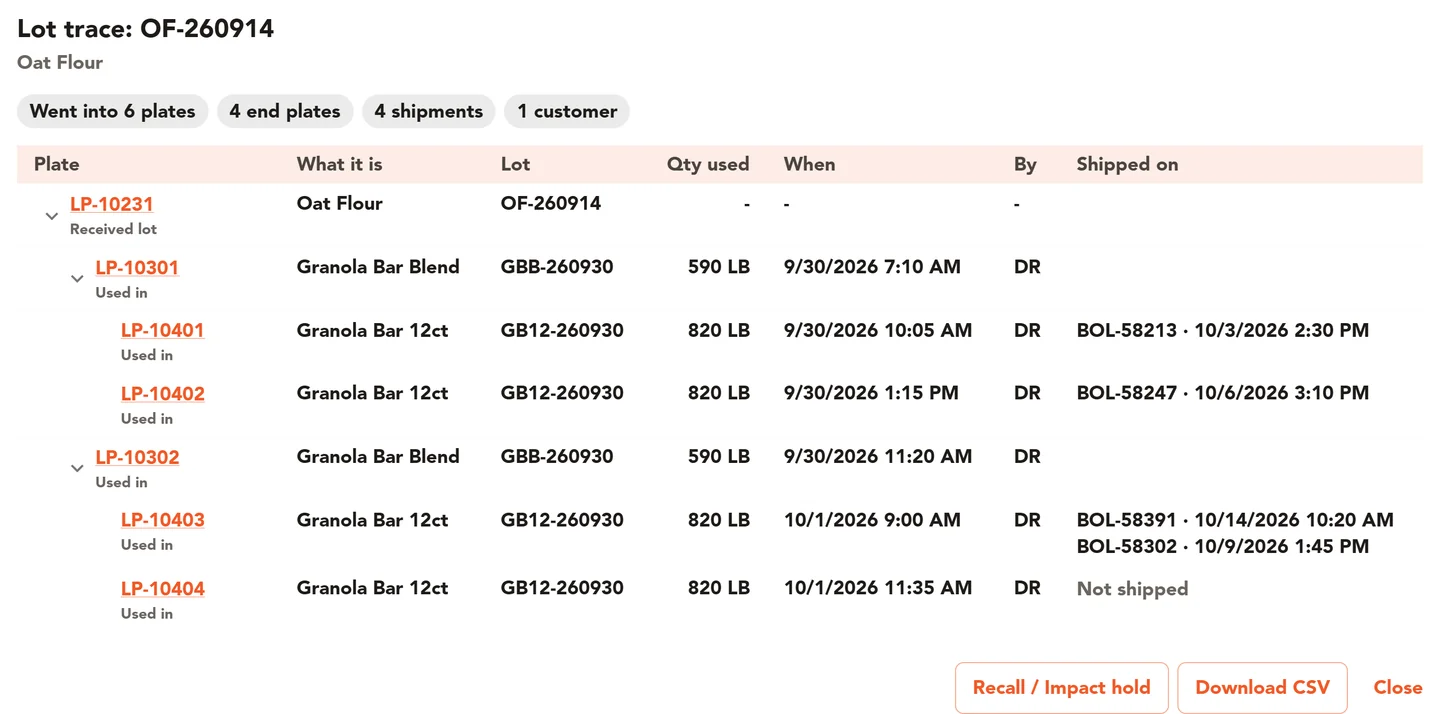
- Lot Trace follows a lot forward. It shows the license plates the lot went into and where those plates shipped. Export the result to CSV for a customer, an auditor, or your own files.
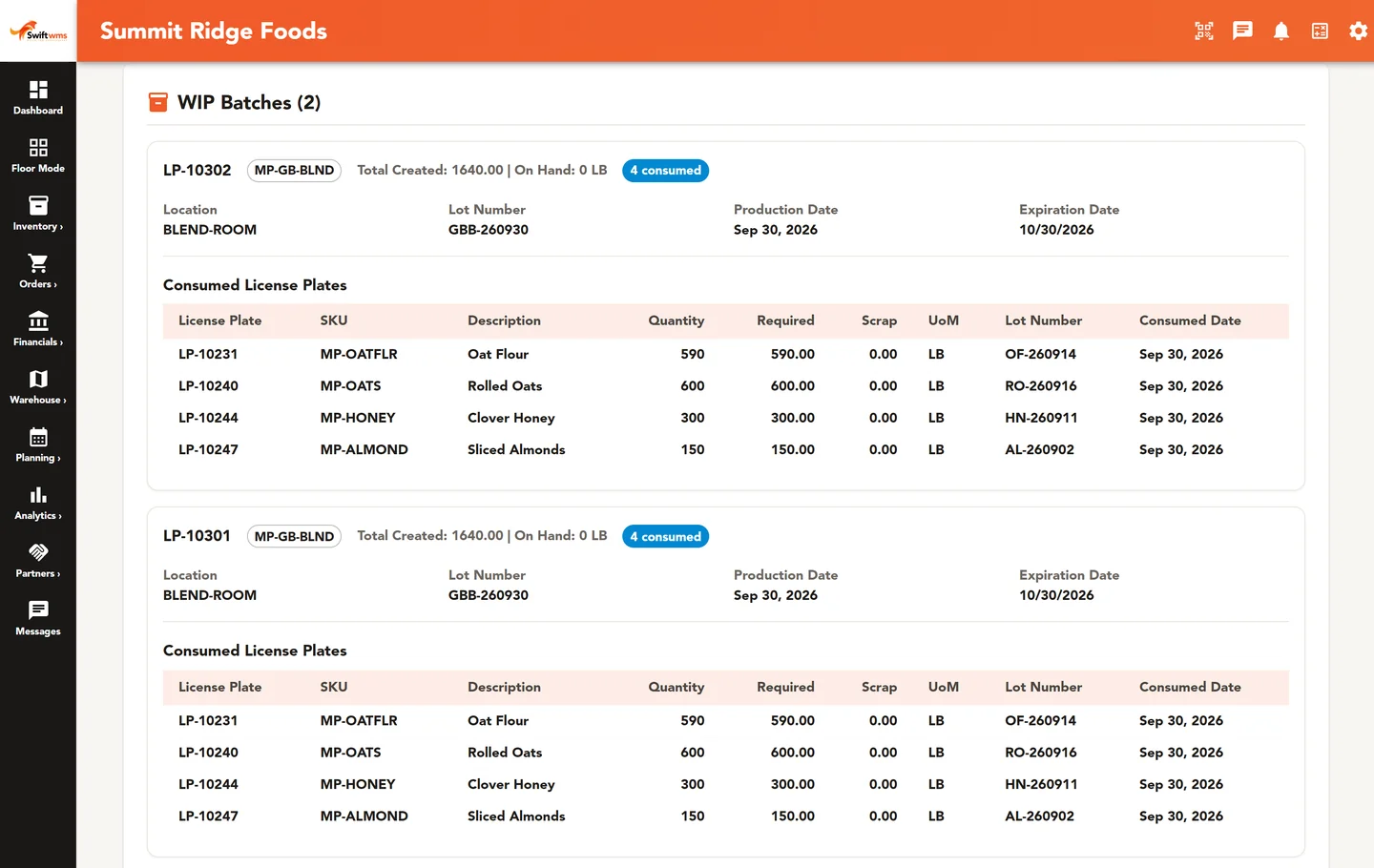
- Batch Genealogy shows the whole chain: receiving, ingredient lot, WIP batch, finished good, and shipment. Export it as a Batch Genealogy & Traceability Report PDF.
- Every work order has a batch record with forward and backward traceability. Open the work order and you can see the lots that went in and where the output went.
Because these views read the same plate and lot records the floor creates every day, nobody has to rebuild the chain from paper travelers. If you want the background on the two directions and the records behind them, read our lot traceability guide for FDA-regulated manufacturers.
Recall Impact: see the full scope before you act
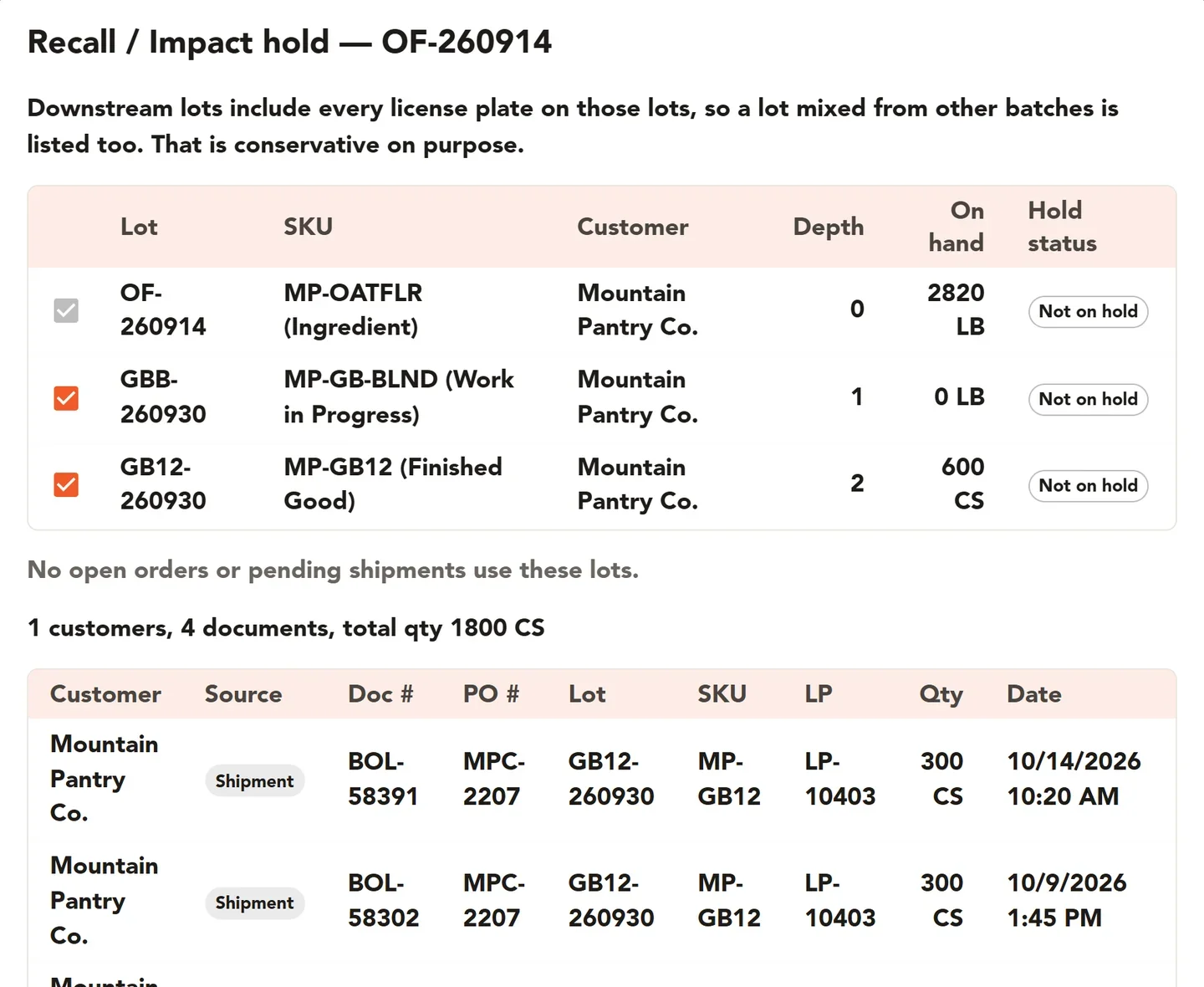
When a supplier calls about a bad lot, the first question is how far it spread. Recall Impact starts from that lot and shows the downstream lots made from it, the work still in progress that uses it, and the destinations where affected product already shipped.
From the same screen you can put every impacted lot on hold in one step. That stops the floor from consuming or shipping affected product while your team decides what to do next.
Recall Impact saves a recall audit record, so later you can show what you found and what you held. The results also export to CSV for the people who need to make calls and write reports.
The same screens work for a practice run. Our step-by-step guide to running a mock recall walks through choosing a lot, tracing it, and scoring the result.
If you are comparing tools, see how Swift WMS lot traceability lines up with Fishbowl.
Holds that follow the lot
A hold only matters if it actually stops product. In Swift WMS, a held lot cannot be shipped, and with lot holds turned on in your production settings it cannot be consumed into production either. Holds are set by lot, not by location, so every plate of that lot is covered wherever it sits in the building.
You can also choose to put new ingredient lots on hold automatically when they are received. Each lot then waits until someone in quality reviews it and uses Release Hold. This suits teams that want paperwork checked before an ingredient reaches a mixer.
There is no separate quarantine location to manage. The plate status reads On Hold and the lot shows up in the On Hold inventory filter, so a forklift driver and a quality lead see the same thing.
COAs attached to the lot they cover
Attach certificate of analysis files directly to a lot, from the Quality page or during receiving. When a customer asks for the COA behind a shipment, you open the lot instead of searching an inbox.
Request COAs sends an email to your suppliers asking for their certificates. On Pro, bulk COA upload can read lot numbers from many files at once. Swift WMS stores the COAs you receive; it does not write them. Our guide to managing certificates of analysis by lot covers how to set up the habit.
A change history you can point to
Each license plate keeps its own LP history. The Audit Logs record the table, the operation, the user, the time, and the old and new values for changes across the main records in the app. A change can be undone from the log when a mistake is caught.
These records do not meet any regulation on their own. They give your quality team the facts it needs to answer questions from customers, auditors, and regulators. Confirm your specific requirements with your quality team or regulator. For foods on FDA's Food Traceability List, see how Swift records line up with FSMA 204, including what Swift does not do.
Quality, Lot Trace, and Recall Impact are part of the Core plan, together with work orders, the bill of materials, and receiving orders. See how batches and work orders are created in production management.
Common questions
- Which plan includes lot traceability and recall impact?
- Quality, Lot Trace, and Recall Impact are part of the Core plan. Core also includes work orders, the bill of materials, and receiving orders, which is where most of the links between lots are created. Pro adds cycle counting, documents, and bulk COA upload. Our team can walk you through which plan fits the way your plant works.
- Can I trace a lot backward as well as forward?
- Yes. Lot Trace follows a lot forward to the plates it went into and where they shipped. The batch record on each work order traces both ways: back to the ingredient lots that went into the batch, and forward to where the output went. Batch Genealogy shows the whole chain from receipt to shipment and exports as a PDF report.
- What happens when I put a lot on hold?
- A held lot cannot be shipped. With lot holds turned on in your production settings, it also cannot be consumed into production. The hold applies to the lot, so it covers every plate of that lot at every location. There is no separate quarantine location to manage. When quality is satisfied, Release Hold returns the lot to use. You can also set new ingredient lots to go on hold automatically when they are received.
- Can Swift WMS write COAs for my products?
- No. Swift WMS stores the COAs your suppliers and labs send you. You attach each COA file to the lot it covers, from the Quality page or during receiving. Request COAs emails your suppliers to ask for certificates. On Pro, bulk COA upload can read lot numbers from many files at once, so a stack of certificates does not have to be filed one by one.
- Is Swift WMS a substitute for a food safety or quality program?
- No. Your quality program decides which records you need and how you use them. Swift WMS keeps the records that help you answer the questions: lot trace, batch records, recall impact, holds, COAs, and a change history. Requirements differ by product, market, and customer, so confirm your specific requirements with your quality team or regulator.
- Can we use Recall Impact for a mock recall?
- Yes. Recall Impact works the same way in a practice run as in a real event. Start from a lot, review the downstream lots, in-flight work, and shipped destinations, and export the results to CSV. One caution: bulk-hold puts real holds on real lots, so decide before the exercise whether your team will use it or only review the list.
Further reading
- How to Run a Mock Recall: A Step-by-Step Guide
A mock recall tests whether you can find every affected lot and shipment before a real recall forces the question. How to plan, run, and score one.
- How to Manage Certificates of Analysis by Lot
Keep every certificate of analysis tied to the lot it covers, chase missing COAs from suppliers, and answer customer requests without digging through email.
- Lot Traceability Guide for FDA-Regulated Manufacturers
What lot traceability means for FDA-regulated manufacturers, the records auditors and customers ask for, and how to trace a lot forward and back.